Connecting NetIQ eDirectory
Status: Draft
Updated: 14 Nov 2025
Needs to be Reviewed
The FastPass Connector for eDirectory enables MyPass Cloud to reset passwords and unlock accounts for users stored in NetIQ eDirectory LDAP repositories. The connector is installed alongside the FastPass Password Manager Server and is licensed individually on a per-user basis.
MyPass Cloud supports integration with multiple eDirectory user repositories from a single tenant or Gateway server. Configuration is managed via the Password Manager Administration Client, which is part of the Password Manager Backend Server. Communication between the Gateway and eDirectory is established over TCP and must be encrypted using either SSL or TLS.
Quick Implementation Pointers
- Verify Network and Certificate Requirements
- Define eDirectory Connection Parameters
- Delegate Admin Account Permissions
- Validate Configuration with Test Tool
Network and Certificate Requirements
To ensure successful integration, the following infrastructure components must be in place:
- eDirectory Server: A reachable NetIQ eDirectory instance with LDAP access enabled.
- FastPass Gateway Server: Typically the main FastPass server, hosting the connector.
- Encryption: SSL or TLS must be enforced for all LDAP communication.
- Trusted Certificate: The Gateway server must trust the root certificate of the eDirectory server.
Required System Parameters
These parameters must be configured in the Password Manager Administration Client:
| Parameter | Description |
|---|---|
| Connection String | Format: LDAP://<SERVERNAME>[:PORT] |
| Base DN for Users | e.g., O=Target |
| Encryption Mode | SSL or TLS (certificate must be trusted and hostname must match) |
| Admin Account | DN of the account with reset rights, e.g., cn=Admin,O=Target |
| Admin Password | Password for the specified admin account |
All values are stored in the Password Manager Data Store (ADAM).
Admin Account Permissions
The designated admin account must have the following delegated rights on the target container or OU:
Read Access
CN_lockedByIntruder__loginIntruderAttempts_
Write Access
_userPassword__lockedByIntruder__loginIntruderAttempts_
These permissions enable MyPass Cloud to perform identity recovery actions such as password resets and account unlocks.
Connector Operation Details
The FastPass Connector for eDirectory performs the following actions in sequence:
- Reset Password: Generates a randomized password for the user
- Unlock Account: Clears intruder lockout flags
- Change Password as User: Attempts to change the password using the user's context
This final step ensures compatibility with environments where Password History is enforced.
Configuration Testing
FastPass provides a standalone tool for validating eDirectory connector configurations:
FastPass Connector eDirectory Test Tool
- Uses the same code base as the production connector
- Can run independently of the Gateway or Admin Client
- No FastPass installation required on the test system
Example Interface
Below is a screenshot of the Password Manager Connector eDirectory Test Tool, showing a successful password reset operation:
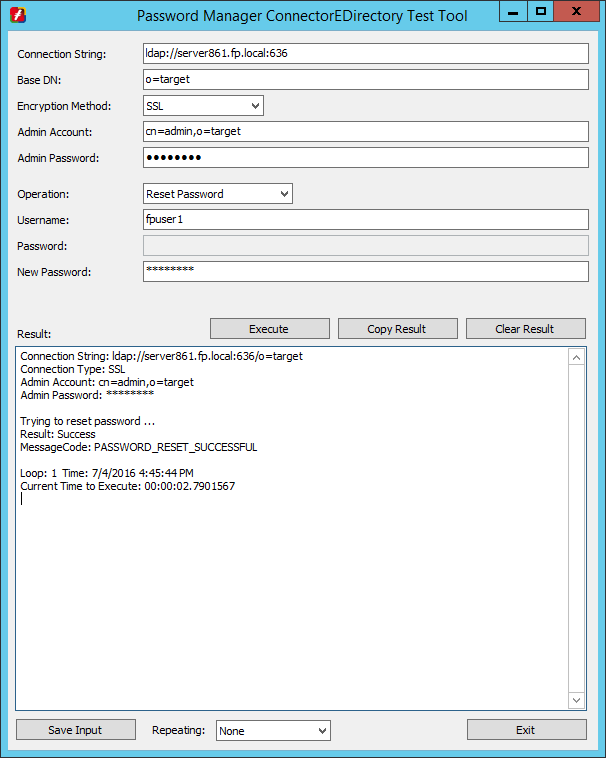
Visible Fields
| Field | Value |
|---|---|
| Connection String | ldap://server861.fp.local:636 |
| Base DN | o=target |
| Encryption Method | SSL |
| Admin Account | cn=admin,o=target |
| Admin Password | ******** |
| Operation | Reset Password |
| Username | fpuser1 |
| New Password | ******** |
Result Output:
Connection String: ldap://server861.fp.local:636/o=target
Connection Type: SSL
Admin Account: cn=admin,o=target
Admin Password: ********

Trying to reset password ...
Result: Success
MessageCode: PASSWORD_RESET_SUCCESSFUL

Loop: 1 Time: 7/4/2016 4:45:44 PM
Current Time to Execute: 00:00:02.7901567
- Uses the same code base as the production connector
- Can run independently of the Gateway or Admin Client
- No FastPass installation required on the test system
Testing Workflow
-
Check Connection
Validate the connection string, encryption mode, and admin credentials. -
Reset Password
Use a test account to confirm the connector can modify_userPassword_. -
Change Password (Optional)
Simulate a user-context password change to test Password History compliance.
Logging and Support
- Logs are saved in the same directory as the test tool executable.
- For assistance, email logs to help@integralis.co.za.
Licensing – Simple Summary
| What you pay for | How it’s calculated |
|---|---|
| Active Directory (required) | One fee per managed user |
| Each additional system (e.g., NetIQ eDirectory / Novell eDirectory) | Additional fee per managed user × per eDirectory tree |
Real-world example
If you manage 1 200 end-users:
- Active Directory → 1 200 × base user password license
-
- 3 eDirectory trees (e.g., Production, Test, DR) → + 3 600 × eDirectory connector user license (1 200 users × 3 trees)
- Total = base AD license + eDirectory connector license for 3 600 “user-tree” seats
Straightforward and transparent - you are charged only for the users whose passwords are actually rotated inside each eDirectory tree.